The agentic AI platform for
construction project
management.

BuildManage, BuildCost, BuildPlan, BuildDrawing and BuildPaper connect scheduling, quality, safety, cost control, CAD drawing and day-to-day PDF document work in one construction technology portfolio.

Daily reality

The plan, the drawings, and the record never line up

Work on site always runs ahead of the paperwork behind it. Build AI keeps the plan, the actual progress, and the proof on one connected thread.

01

The plan stops matching the site

Progress is typed into a file once a week. By the time the slippage is visible on paper, the crews have already lost those days.

02

Someone is still building from an old sheet

A revision goes out by email and chat, but the old print stays on site. The difference surfaces as rework, and no one can say which drawing the crew held.

03

Nothing can be proven afterwards

Photos sit on personal phones, checks on paper, approvals inside messages. When a claim, an audit, or an incident comes, no one can show who signed off and when.

With Build AI

Products

A construction AI suite for every project stage

BuildPlan, BuildManage, BuildCost, BuildDrawing, and BuildPaper cover planning, site operations, cost control, CAD drawing, and daily PDF document work.

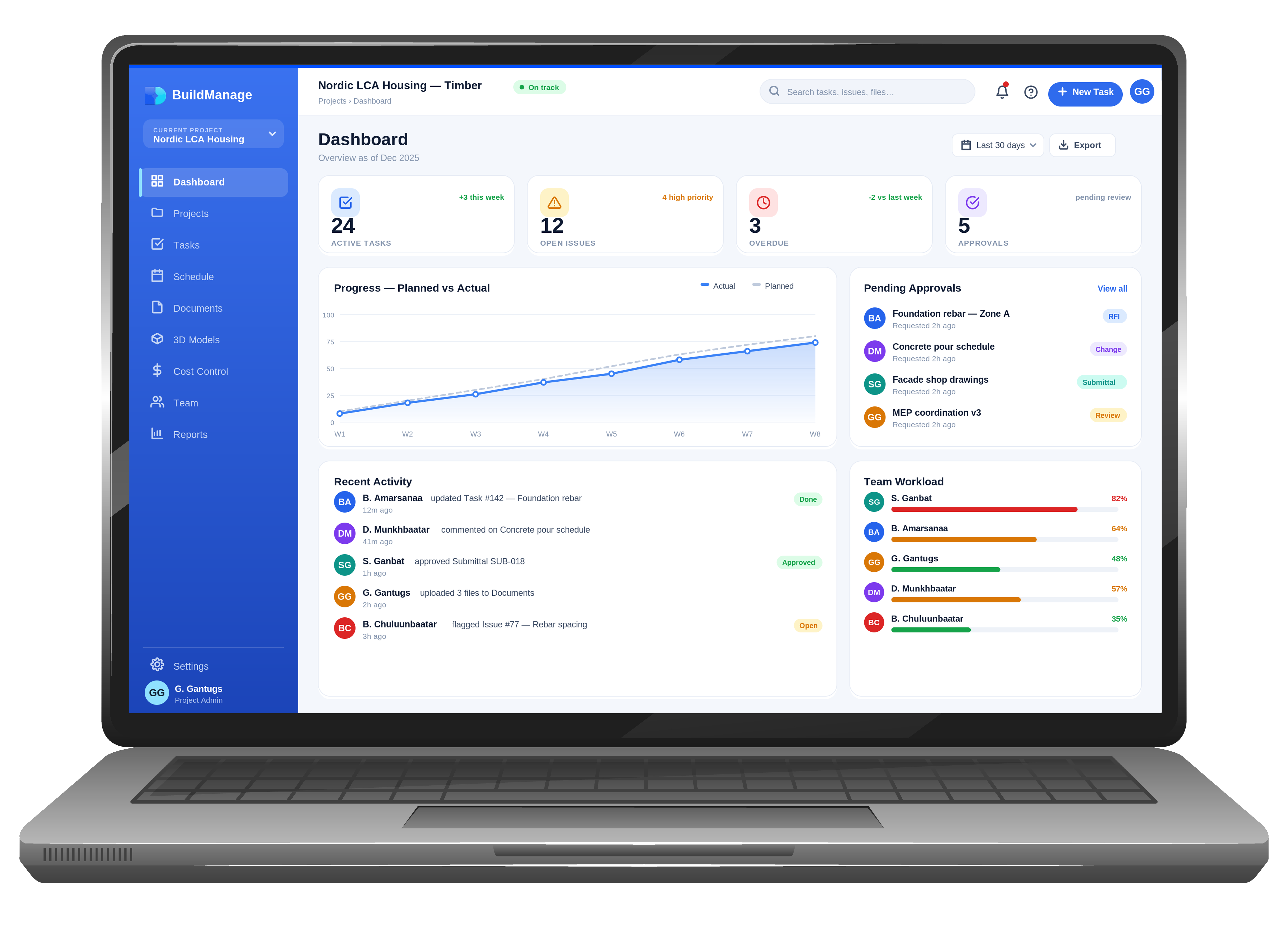
BUILDMANAGE dashboard
BUILDMANAGE

Construction management, run with an agentic AI system

Gantt scheduling, QA/QC inspections, safety management, drawing control, photo records, BIM Viewer, and AI reporting โ€” a comprehensive construction management platform. Works in the browser on mobile, tablet, and desktop โ€” no installation.

Best forSite and project managers
SolvesScattered reports, drawings, and follow-up
ResultOne real-time operating view
  • WBS, Gantt, Leanboard & daily reports โ€” imports Primavera P6 (XER/XML) and MS Project XML
  • EVM, S-curve, CPI/SPI and baseline comparison
  • Quality, ITP, safety, risk register & NCR close-out
  • Drawings, BIM, photos, documents and RFI/TQ in one store
  • Planning agent โ€” delay-recovery plans computed on the critical path
  • BuildChat โ€” team chat with Assigned, Tasks, ToDo, Agenda, Inbox, Replies and personal file storage
BUILDPLAN feasibility
BUILDPLAN

From a plot on the map to a feasibility case

Draw the site, generate massing against Japanese building code, run the numbers and export a PDF proposal โ€” one web app, built for sites in Japan.

Best forDevelopers and planning teams
SolvesSlow site study and concept comparison
ResultFeasibility options faster
  • Map-based site setup with live area and perimeter
  • Massing from use, structure and floor count
  • Japanese code checks: coverage ratio, floor area ratio, height
  • Financials: NOI, cap rate, payback, cash-on-cash return
  • AI exterior image and PDF proposal export
BUILDCOST projects
BUILDCOST

Budget, actual cost & profit control in real time

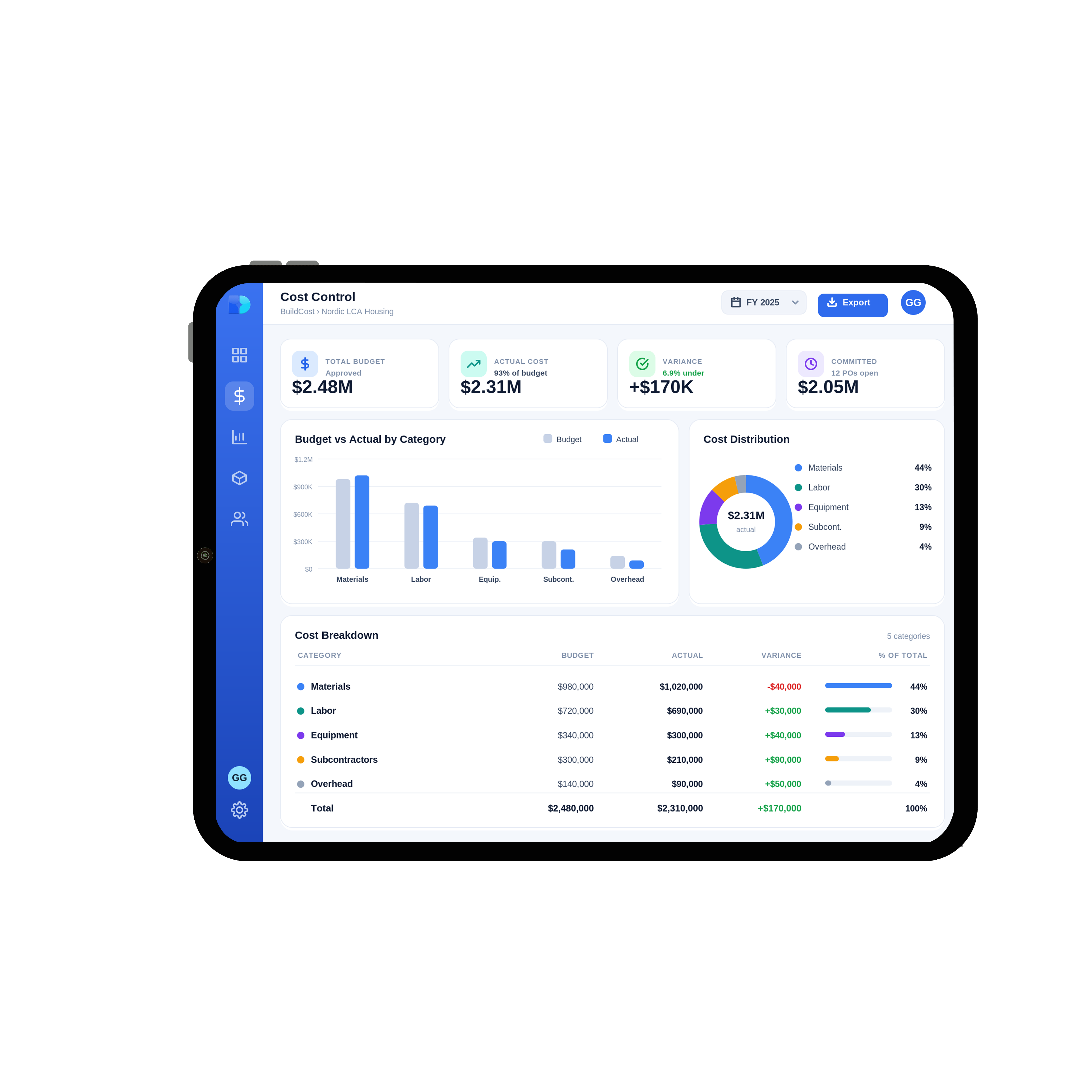
BOQ & Estimate Studio, AI receipt capture (OCR), approval workflows, payment tracking, and a context-aware AI assistant โ€” unified for real-time portfolio profitability.

Best forCost control and finance leads
SolvesLate visibility into budget drift
ResultEarlier margin protection
  • Control budget, versioning & schedule-linked budgets
  • AI receipt capture with a confidence score and a review queue
  • Variations, purchase orders & payment tracking
  • Four-eyes approvals โ€” no self-approval โ€” with officially signed PDFs where enabled
  • Budget vs actual and WBS-level reports with AI summaries and Excel export
BuildDrawing architectural CAD workspace with an AI edit preview and DXF/PDF export
BUILDDRAWING

AI-assisted CAD drawing in the browser

Create and edit construction drawings with professional CAD tools and an AI Drawing Agent. Work from plain-language instructions, images or imported drawings, then export to DXF or PDF.

Best forArchitects, engineers and site teams
SolvesSlow manual drafting and drawing edits
ResultCAD-ready output with AI assistance
  • AI Drawing Agent for plain-language drawing and selected-object edits
  • Professional line, wall, dimension, layer, snap and scale tools
  • Import supported DXF drawings and work from plan images
  • Preview AI changes before applying them to the drawing
  • Export DXF for CAD workflows or PDF with sheet output
BuildPaper PDF editor showing an annotated construction drawing, OCR search and page organization
BUILDPAPER

A Japanese-first PDF editor for Windows

Open, mark up, organize, OCR, print and safely save PDFs in one Windows desktop app โ€” with Japanese document workflows and DocuWorks-to-PDF conversion where DocuWorks is installed.

Best forJapanese office and construction teams
SolvesFragmented PDF markup, page work and document handling
ResultOne Windows workflow for daily PDF work
  • Japanese PDF search, annotations, stamps, signatures and redaction
  • Reorder, rotate, delete, insert, extract, split and combine PDF pages
  • Windows Japanese OCR for scanned PDFs โ€” processed locally without an internet connection
  • Save history, restore points, external-change detection and pre-save validation
  • DocuWorks XDW/XBD to PDF conversion on PCs with DocuWorks installed
AI

An AI that prepares the work. You keep the approval.

Five conversational agents and nine automatic AI features run inside the suite. Each one drafts, analyses or proposes โ€” and stops at a preview card until someone approves it.

Planning agent

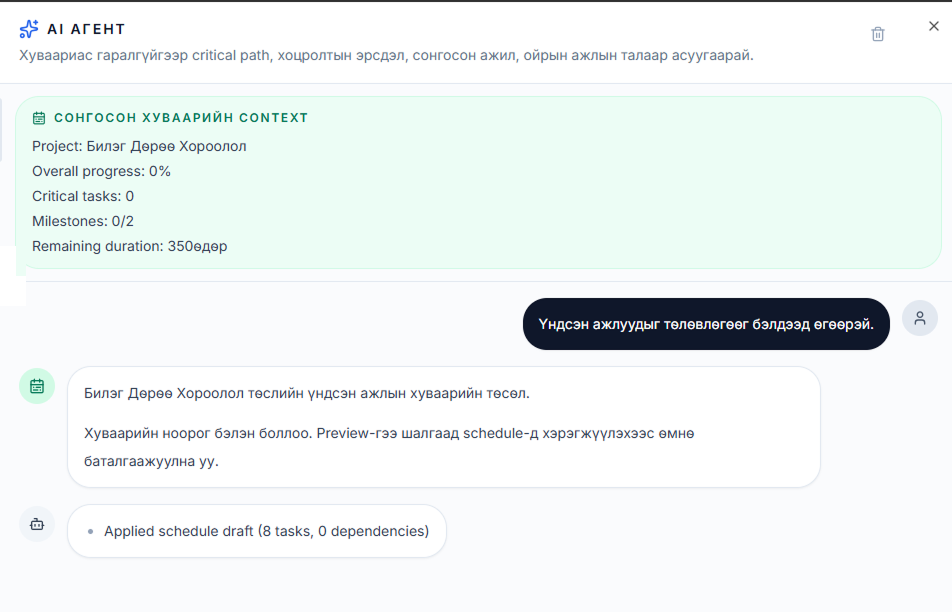
Ask it to recover a slipped date. It reads the critical path and proposes a concrete bundle of edits, with the forecast finish it calculates โ€” not a guess.

Answers that cite their source

Agents read across issues, inspections, NCRs, risks, photos, reports, RFIs, meeting decisions and the schedule. Every answer links the record it came from.

BuildChat ยท AI agent
Planning agent drafting a schedule inside BuildManage
The agent previews its draft and saves nothing until a person presses approve.
BuildManage ยท Reports
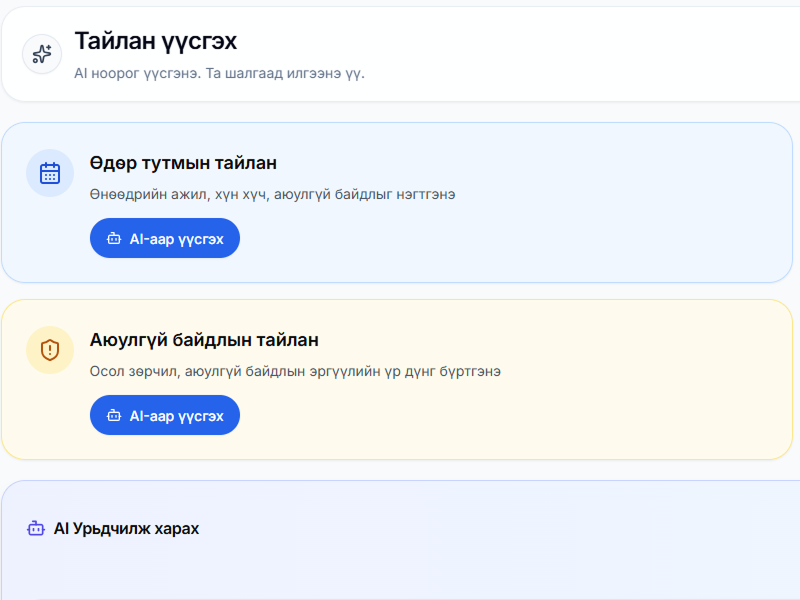
An AI-drafted progress report inside BuildManage
Daily, weekly, safety and progress reports start as an AI draft โ€” a person checks it, then sends it.

Photo to report, end to end

A site photo is analysed for defects and safety, becomes an assigned issue, and lands in the daily report. Once that report is approved, quantities flow back into the schedule.

BuildChat, where the agents live

Team chat inside BuildManage, with Assigned, Tasks, ToDo, Agenda, Inbox, Replies and personal file storage alongside it. BuildManager AI sees cost and finance; BuildEngineer AI does not. The persona follows each personโ€™s own permissions.

What the agents will not do

  • Save anything on their own โ€” every change waits on a person
  • Answer from memory when the evidence is thin โ€” they decline instead
  • See past your permissions โ€” access is re-checked on every answer
Anywhere, any device

Desktop, tablet, phone โ€” one system

Field engineers log inspections, photos and the day's quantities on a phone or tablet. Managers run the schedule, drawings and approvals from an office screen โ€” same records, instant sync.

BUILDMANAGE on desktop
BUILDMANAGE on tablet
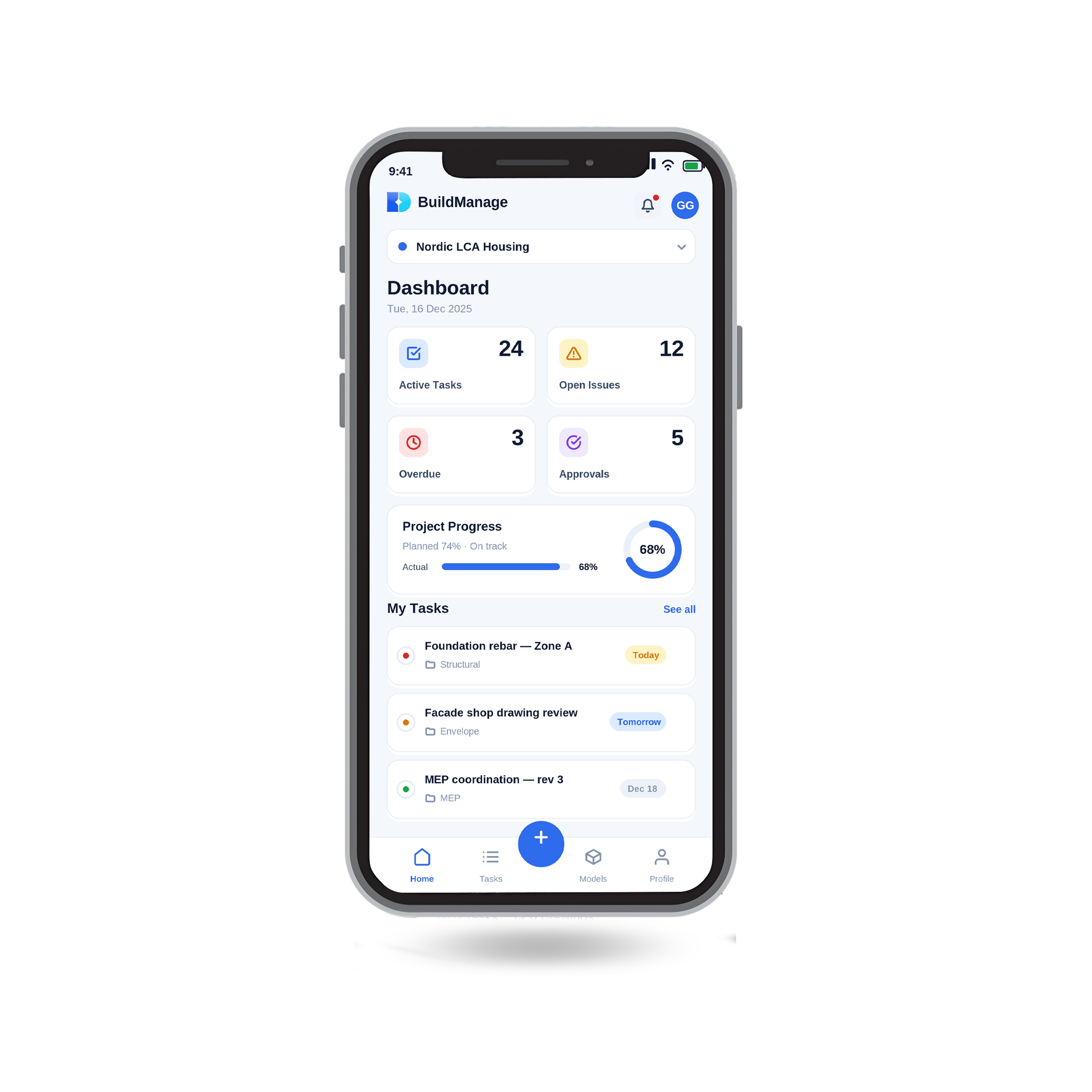
BUILDMANAGE on mobile
Download catalog

Get the Build AI executive catalog

A single executive-ready catalog covering BuildManage, BuildPlan, and BuildCost. Share it internally, with finance, or with the construction lead.

One unified company catalogExecutive-ready overviewMN / EN / JP follow-up

Build AI ะบะพะผะฟะฐะฝะธะนะฝ ะบะฐั‚ะฐะปะพะณ

Planning, site operations, and cost control in one document โ€” product summaries, key features, and next steps.

  • Build AI suite overview
  • BuildPlan, BuildManage & BuildCost summaries
  • Key features for each product
  • Office contacts and next steps

๐Ÿ”’ We use your details only to follow up about Build AI โ€” no newsletter spam.

Request the catalog

Submit once โ€” the catalog opens immediately and our team can follow up with a demo, brief, or PoC scope if needed.

Catalog language
Get in touch

Start a pilot or request a walkthrough

Fill out the form and our team will reach out within one business day.

Most inquiries get a reply within 1 business day. Demos focus on your selected workflow, and briefs are formatted for internal sharing.

Our offices

๐Ÿ‡ฏ๐Ÿ‡ต Japan Office

contact@dxmaster.net+81 90-1013-3727

1-22-7 Kasuga-koen, Kasuga-shi, Fukuoka, Japan

๐Ÿ‡ฒ๐Ÿ‡ณ Mongolia Office

info@build-ai.tech+976 9901-6721

Yalalt Plaza Office, 4th Floor #409, 5th Khoroo, Chingeltei District, Ulaanbaatar, Mongolia

Most inquiries get a reply within 1 business day. Demos focus on your selected workflow, and briefs are formatted for internal sharing.